Medical alert systems in Canada: features and monthly fees
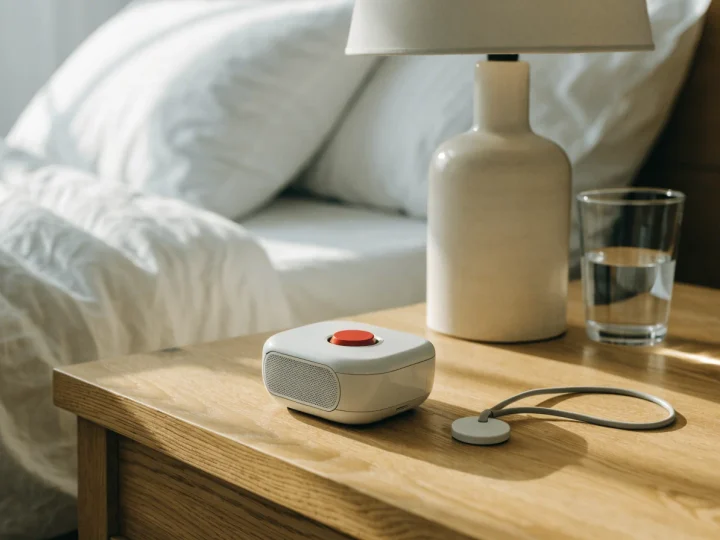
How medical alert systems work in Canada, what fall detection can and can't do, features to compare, and plans from five providers with their fees.
This article is general information, not medical advice. For advice about your own situation, talk to a doctor, occupational therapist, physiotherapist or other qualified professional. In an emergency, call 911.
Quick answer
A medical alert system lets you call for help by pressing a button you wear. With a monitored plan, the call goes to a 24/7 monitoring centre that can reach your family or 911. The monitored plans in our tables cost C$34.95 to C$80 a month. Some smartwatches can call 911 or your contacts with no monitoring plan. Fall detection can call for help on its own, but no maker says it catches every fall.
In the US? Our guide to medical alert systems in the US covers US plans and what Medicare covers.
The types at a glance
| In-home system | Mobile system with GPS | Smartwatch | Call buttons with a pager | |
|---|---|---|---|---|
| What it looks like | 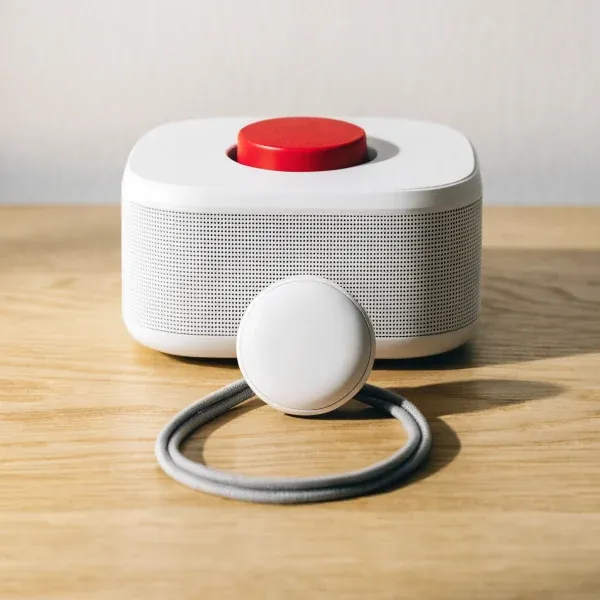 |
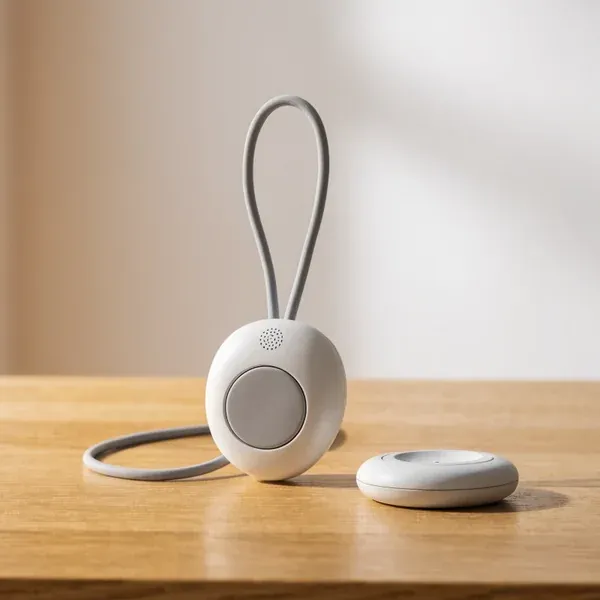 |
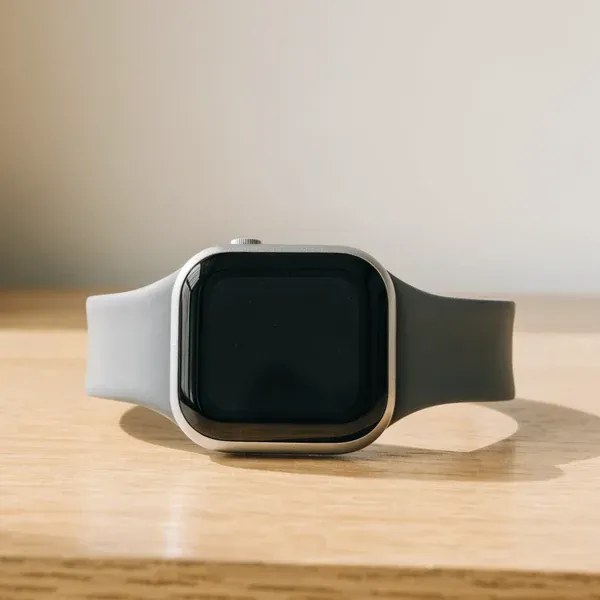 |
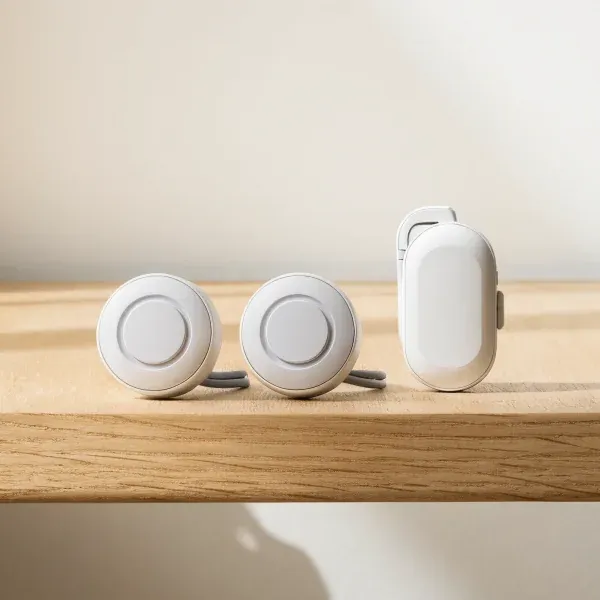 |
| Where it works | At home, near a base unit. TELUS and Life Assure list up to 600 ft [1] [2] | Where there’s cellular service [3] | Through your paired phone. Some cellular models work on their own, with a plan [4] [5] | In the home, within range. Up to 300 ft for the one below [6] |
| Who gets the call | A monitoring centre, 24/7 | A monitoring centre, 24/7 | 911, your contacts or both, depending on the watch [7] [8] | The person carrying the pager |
| How it connects | A base unit on a landline or the cellular network | Cellular, with GPS for your location | Your phone, or the watch’s own cellular plan | A radio signal from the button to the pager |
| Fall detection | Extra on three of the four plans below, C$8 to C$10 a month [9] [10] [11] | Included on four of the five plans below | On some Apple, Google and Samsung watches [7] [5] [8] | No |
| Monthly cost | C$34.95 to C$60 on the plans below | C$45 to C$80 on the plans below | No monitoring fee. A cellular plan for the watch costs extra | None |
| Charging | The base plugs in. Some buttons never need charging | Needs regular charging. Makers list 2 to 16 days per charge | Apple lists up to 18 hours per charge for its SE 3 [4] | Replaceable batteries |
Where to buy a medical alert system
You can sign up for a monitored service online or by phone. The first two tables list plans from five providers that sell across Canada and post their prices online. The figures come from each provider’s own pages, linked in the sources. We read them on October 1, 2026. Prices and sales change often, so check before you sign up. We haven’t tested these services.
| Option | Monthly fee | Fall detection | Contract and fees | Sold in | Where to buy |
|---|---|---|---|---|---|
| Life Assure Classic Home [9] | C$34.95, or C$384.45 a year | C$9.99 a month extra | No contract. No activation fee | Canada only | See it at Life Assure: Life Assure Classic Home (opens in a new tab) |
| Galaxy Home Cellular System [12] | C$34.95. Yearly plans get 2 months free | C$44.95 a month for the version with it | 3-month agreement. Cancel with 30 days' written notice. No activation fee | Canada only | See it at Galaxy Medical Alert Systems: Galaxy Home Cellular System (opens in a new tab) |
| SecurMEDIC SmartSAFE Home [13] | C$35 | C$43 a month for the version with it | Month to month. One month's fee to cancel. C$99.95 to program the device | Canada only | See it at SecurMEDIC: SecurMEDIC SmartSAFE Home (opens in a new tab) |
| TELUS Health LivingWell Companion Home [1] | C$45 on a 1-year term, or C$60 month to month. C$10 less for existing TELUS or Koodo customers | Not listed on the plan page | C$35 to activate. Leaving a term early may cost C$15 per month left (C$50 at most in Quebec) | Canada only | See it at TELUS Health: TELUS Health LivingWell Companion Home (opens in a new tab) |
Fees as each provider listed them on October 1, 2026. Ask whether tax is extra. Life Assure's Classic Home needs a landline. The other three use the cellular network.
| Option | Monthly fee | Battery per charge | Contract and fees | Sold in | Where to buy |
|---|---|---|---|---|---|
| SecurMEDIC SmartSAFE PLUS [14] | C$45 | Up to 3 days | Month to month. One month's fee to cancel. C$99.95 to program the device | Canada only | See it at SecurMEDIC: SecurMEDIC SmartSAFE PLUS (opens in a new tab) |
| Galaxy Mobile System with GPS & Fall Detection [15] | C$49.95. Yearly plans get 2 months free | 6 to 16 days, by mode | 3-month agreement. Cancel with 30 days' written notice. No activation fee | Canada only | See it at Galaxy Medical Alert Systems: Galaxy Mobile System with GPS & Fall Detection (opens in a new tab) |
| Holo Alert Holo Pro [16] | C$49.95 on sale (regular C$64.95), or C$599.95 a year on sale (regular C$779.95) | 2 to 3 days | Renews monthly. Cancel with 30 days' written notice. Device fee C$89.97 on sale (regular C$299.90), none with the yearly plan | Canada only | See it at Holo Alert: Holo Alert Holo Pro (opens in a new tab) |
| Life Assure Premium Mobile Plus [17] | C$54.95, or C$604.45 a year | Up to 48 hours | No contract. No activation fee | Canada only | See it at Life Assure: Life Assure Premium Mobile Plus (opens in a new tab) |
| TELUS Health Medical Alert Pendant [3] | C$65 on a 1-year term, or C$80 month to month. C$10 less for existing TELUS or Koodo customers | Up to 6 days | C$35 to activate. Leaving a term early may cost C$15 per month left (C$50 at most in Quebec) | Canada only | See it at TELUS Health: TELUS Health Medical Alert Pendant (opens in a new tab) |
Fees as each provider listed them on October 1, 2026. Ask whether tax is extra. Fall detection is included on all but Life Assure's, where it costs C$9.99 a month extra. Battery figures are the makers' and depend on use.
Smartwatches and the equipment below are bought once, with no monitoring fee. Each is sold on Amazon in Canada and the US.
| Option | Phone it works with | Fall detection | Battery, maker's figure | Sold in | Where to buy |
|---|---|---|---|---|---|
| Apple Watch SE 3 (GPS, 40 mm) [4] [7] | iPhone 11 or later | Turns on by itself for people 55 and over who entered their age | Up to 18 hours | Canada and US | See it at Amazon: Apple Watch SE 3 (GPS, 40 mm) (opens in a new tab) |
| Samsung Galaxy Watch9 (Bluetooth, 40 mm) [38] [8] | Android phones | Off until you turn it on in the Galaxy Wearable app | Up to 40 hours, or 30 with the always-on display | Canada and US | See it at Amazon: Samsung Galaxy Watch9 (Bluetooth, 40 mm) (opens in a new tab) |
Specs are the makers'. These versions have no cellular service of their own: they reach help through the paired phone or Wi-Fi. Versions with cellular service need their own wireless plan.
| Option | Type | How it helps | Details | Sold in | Where to buy |
|---|---|---|---|---|---|
| Smart Caregiver Call Buttons with Standalone Pager TL-5102TP [18] | Call buttons with a pager | Rings a pager that someone at home carries. Doesn't call 911 or a monitoring centre | Two buttons to wear on a lanyard or mount on a wall. Up to 300 ft range | Canada and US | See it at Amazon: Smart Caregiver Call Buttons with Standalone Pager TL-5102TP (opens in a new tab) |
| Master Lock 5400D Portable Lock Box [19] | Key lock box for a door knob | Holds a house key for responders | Set-your-own 4-digit code. 6¼ × 3¼ × 1½ in | Canada and US | See it at Amazon: Master Lock 5400D Portable Lock Box (opens in a new tab) |
| Master Lock 5401D Wall Mount Lock Box [20] | Key lock box for a wall | Holds a house key for responders | Set-your-own 4-digit code. Inside: 3¼ × 2¼ × 1 in | Canada and US | See it at Amazon: Master Lock 5401D Wall Mount Lock Box (opens in a new tab) |
Specs are the makers'.
More options at Amazon: caregiver pagers (opens in a new tab), key lock boxes (opens in a new tab) and smartwatches with fall detection (opens in a new tab).
Questions to ask a medical alert provider
From simpleaging.com. This checklist is general information, not medical advice.
Print this list and keep it by the phone when you call.
The service
- Where is your monitoring centre, and what languages do the operators speak?
- When I press the button, who answers first: a person or a recorded voice? TELUS, for one, puts you through to a virtual assistant first [3].
- How long does it usually take to reach a person? Galaxy says about 40 seconds [21].
- Who do you call: my family, 911 or both? Can I choose the order?
- What happens if I can’t speak?
- Does it work when I travel, including outside Canada?
The equipment
- Does it need a landline, or does it use the cellular network? Is the signal good where I live?
- How far from the base unit does the button work? Can we test it in every room and the yard?
- How long does the battery last, and how will I know it’s low?
- Can I wear it in the shower? What is its water rating?
- Is fall detection included, or extra? How do I need to wear it?
- Is there a lock box, or a way to give responders a key code?
- Is there an app for family, and what does it cost?
Costs and contract
- What is the monthly fee? What will it be after a sale or the first term ends?
- Are there activation, programming, device or shipping fees? Is tax extra?
- Is there a contract? How do I cancel, and is there a fee to leave early?
- Do I rent the equipment or own it? What if it’s lost or damaged?
- Is there a trial period?
Testing
- How often should we test it, and how?
How a medical alert system works
The Public Health Agency of Canada describes emergency response systems as “communication devices that will get help for you in case of an emergency.” You wear a pendant or a wristwatch-type device with a call button, and a company charges a monthly fee to monitor it [22].
TELUS lists these steps for its in-home system [1]:
- You press the button.
- An operator calls you through the base unit’s speaker and asks if you need help.
- If you ask for help or can’t answer, the operator follows your contact list.
- If needed, the operator calls emergency services.
On TELUS’s mobile pendant, a virtual assistant asks first, then passes you to an operator if you need help or can’t answer [3]. TELUS’s guide says that if the operator can’t hear you, they will still send help [23].
In-home systems
A base unit sits in your home and plugs into the wall. You wear a button around your neck or on your wrist. When you press it, the base unit calls the monitoring centre, and you talk through its speaker. TELUS says its base can hear you around corners and in other rooms [23].
The button only works near the base. TELUS’s guide says its pendant stays connected up to 600 ft from the base unit, and “it won’t work outside of this range” [23].
Some base units use a landline. Life Assure’s Classic Home needs one [9]. Its terms say the equipment won’t work while your phone line is out [24]. Other base units use the cellular network, like TELUS’s [23].
Mobile systems with GPS
A mobile system puts everything in one small device you wear, with its own speaker. It uses the cellular network, so it works away from home too. TELUS says its pendant works “anywhere in Canada where cellular coverage is available.” It also says GPS location is approximate [3].
Smartwatches
Some smartwatches can call for help with no monitoring plan. They call 911 or send a message to your contacts. No monitoring centre is involved.
- Apple Watch. After a hard fall, if you don’t move for about a minute, it calls emergency services. Then it sends your location to your emergency contacts. Fall detection turns on by itself for people 55 and over who entered their age [7]. The Apple Watch SE 3 (opens in a new tab) needs an iPhone 11 or later [4].
- Google Pixel Watch. After a hard fall, if you don’t respond, it calls emergency services after 60 seconds [5]. The Pixel Watch 5 works with most phones running Android 12 or newer [25].
- Samsung Galaxy Watch. Fall detection is off until you turn it on. If you don’t respond for 60 seconds, it sends an SOS message to the contacts you chose [8]. The Galaxy Watch9 (opens in a new tab) works with Android phones [38].
Away from your phone, a watch may need its own cellular service to call for help. Apple says cellular service needs a wireless plan [4]. Google says its LTE watch needs an active LTE connection to call emergency services [5]. Samsung says SOS calls and messages need a network connection and a paired smartphone [8].
Some monitored providers also sell a watch-style device with their monitoring. SecurMEDIC’s is one [26].
Call buttons with a pager
This is the simplest type. Press a call button, and a pager that someone in the home carries goes off. It doesn’t call anyone outside the home. Smart Caregiver lists a range of up to 300 ft for its system. It says the system has no out-of-range warning, so test it where you’ll use it. It also says the device “is not a substitute for direct visual monitoring by caregiver” [6].
Automatic fall detection
Some devices can call for help on their own after a fall. They use motion sensors. TELUS’s guide says its fall detection looks at “orientation change, impact intensity and impact speed” [23].
No maker says it catches every fall. In their own words:
- TELUS: fall detection “might not detect all falls” [23].
- Life Assure: it “does not detect 100% of falls” [9].
- Galaxy: its pendant “will not detect 100% of all falls” [15].
- SecurMEDIC: “we cannot guarantee that every serious fall will be detected” [14].
- Holo Alert: it “may not detect all falls” [16].
- Apple: “Apple Watch cannot detect all falls” [7].
- Samsung: “A Galaxy Watch cannot detect all falls” [8].
- Google: “Fall detection can’t detect all falls” [5].
The makers also give these tips:
- Press the button anyway. TELUS says that if you fall, don’t wait for the automatic call. Press and hold the button if you can [3].
- Wear it the way the maker says. TELUS says its fall detection is “usually more accurate” when worn on the lanyard on your chest, over your clothes [3]. Life Assure says to wear its fall detection only around the neck [9].
- Expect some false alarms. Apple, Google and Samsung say high-impact activity can set off fall detection [7] [5] [8]. If an Apple Watch calls emergency services by mistake, Apple says not to hang up. Wait for the responder and explain that you don’t need help [7].
Features to compare
- Range from the base unit. TELUS and Life Assure list up to 600 ft [1] [2]. Test the button in each room and in the yard.
- Battery and charging. Mobile devices need regular charging; the table lists each maker’s figure. Some in-home buttons never need charging: TELUS lists 3 to 5 years for its built-in battery [1], and SecurMEDIC lists 5 to 7 years [13]. Base units have a backup battery for power outages: up to 80 hours at Life Assure and at least 24 hours at Galaxy [2] [12].
- Water resistance. TELUS, Galaxy and Holo Alert rate their mobile devices IP67 [3] [15] [16]. TELUS says its pendant can be worn in the shower but should not be submerged [3]. SecurMEDIC says its in-home button is water resistant for the bath and shower [13]. TELUS’s in-home device is water resistant to 1 metre, but it isn’t made for swimming [23].
- Talking to the operator. With an in-home system, you talk through the base unit. A mobile device has a speaker and microphone built in [1] [3].
- Monitoring centre and languages. TELUS, Life Assure and SecurMEDIC say your call is answered in Canada [1] [9] [13], and Holo Alert calls its monitoring team Canadian [16]. Galaxy’s site doesn’t say where its centre is. Life Assure serves English and French [9], and SecurMEDIC offers bilingual support [26]. TELUS offers translation in over 140 languages [1], and Galaxy lists support in over 150 [27].
- Cellular coverage. TELUS says poor coverage may mean the device can’t place a call, detect a fall or find your location [3]. Check the signal where the person lives and goes.
- Contract and fees. Life Assure has no contract [2], and Life Assure and Galaxy list no activation fee [28] [27]. Galaxy and Holo Alert need 30 days’ written notice to cancel [29] [30]. SecurMEDIC’s terms charge one month’s fee to cancel [31]. TELUS may charge a fee if you leave a term early [1], and so may Holo Alert: C$30 for each full month left [30].
- Renting the equipment. With these plans, you rent the device and send it back when you cancel [1] [29] [30] [24] [31].
- A way in for responders. Galaxy includes a lock box, and Life Assure rents one for C$4.99 a month [12] [9]. Both say they give the code to emergency responders [21] [2]. You can also buy a lock box, like the two in the table above.
- An app for family. TELUS includes one with its pendant [3]. Life Assure’s app is free [28], and Holo Alert charges C$120 a year for its app [16].
Costs and funding for medical alerts
The monitored plans in our tables cost C$34.95 to C$80 a month. Some add a one-time fee for activation, programming or the device. Sale prices and first-year prices can go up later. At TELUS, for example, the month-to-month price applies after the 1-year term [1]. A smartwatch or a pager has no monitoring fee, but a cellular plan for a watch costs extra.
Canada
Planning other changes at home, like grab bars? Our tax credit calculator estimates what the Home Accessibility Tax Credit may be worth for a renovation.
United States
Questions to ask
For the provider, use the checklist above.
An occupational therapist, physiotherapist or doctor
- Would a medical alert help me, and which type fits my day?
- Is fall detection worth adding for me?
- I have a pacemaker. Is it OK to wear a cellular device? TELUS suggests asking your doctor and the pacemaker’s maker [3].
- Can you show me how to get up from the floor? Researchers who followed people over 90 said people need training in ways to get up from the floor [37].
- What else at home could make moving around easier?
Family and the people on the call list
- Who will be on the list, and will they answer at night?
- Who has a key, or should we use a lock box?
- Does the person who will wear it agree to it? TELUS asks you to get the user’s consent before you share their information or set up its family app [1].
If the family is also thinking about a camera, our guide to cameras in a parent’s home covers consent and privacy.
Safety notes and when to talk to a professional
Wear it, and use it. A study in the UK followed 110 people over 90 for a year. Most of those who fell could not get up on their own at least once. Call alarms were widely available, but they weren’t used in most of the falls that led to a long time on the floor [37]. TELUS’s guide says to wear the device all day [23].
Test it. Test it after setup and as often as your provider says. TELUS says monthly for its in-home system and weekly for its pendant [1] [3]. Galaxy says weekly, and Life Assure’s terms say at least once a month [21] [24]. Tell the operator it’s a test.
Keep it charged. A mobile device only works when it has power. Make charging part of your routine, and learn how your device shows a low battery. TELUS’s pendant lights up when it needs charging [3].
Check the water rating. Wear it in the shower only if the maker says you can. TELUS says to towel-dry its pendant after it gets wet [3].
Use the cord it came with. TELUS’s guide says to use only the lanyard provided, “which is designed for safety” [23].
Keep your details up to date. Tell your provider when phone numbers, door codes or health details change. Life Assure’s terms say its centre can only call the numbers you’ve given [24].
When to talk to a professional. If someone has fallen, feels unsteady or worries about falling, talk to a doctor. A doctor can look for causes and may suggest seeing a physiotherapist or occupational therapist. An occupational therapist can see how a person manages at home and suggest changes, equipment or a call system that suits them. Our home safety checklist goes room by room, our grab bar guide shows where bars go in the bathroom, and our guide to preparing a home after a hospital stay covers the first weeks home.